Cuee
Your personal AI assistant for Mac.
- All core Cuee capabilities in one licence
- Private conversation, documents and supported Mac tasks
- Keep your purchased features forever
- One year of product updates
- 14-day, no-questions-asked refund
Think aloud. Work with your documents. Get help with everyday Mac tasks, with local AI and no monthly subscription.
Local features work offline after setup. Websites, weather, connected accounts and downloads need internet. Check release status for each feature.

Your ideas.
Your documents.
Your assistant.
Cuee · ready
Two licence levels. One Cuee app. Start with your personal assistant; upgrade when Super Cuee is ready for you.

Cuee helps with individual requests using its existing tools. Super Cuee adds proposed goal-to-workflow planning, approved skill learning, deeper research and content creation. Super Cuee is in development.
Your personal AI assistant for Mac.
Cuee, with more ambitious workflows.
$299 Cuee + $200 upgrade = $499 Super Cuee
During the founder upgrade offer, a $299 Cuee purchase receives full credit toward Super Cuee. The exact price will be shown before payment. Future upgrade prices may differ.
Upgrades will be available when Super Cuee launches. Joining the founder list does not purchase a licence or reserve upgrade eligibility.
Lifetime means a perpetual licence, not lifetime updates. After your included year, keep using your eligible version; further updates can be an optional purchase. No automatic renewal.
One personal assistant for your documents, your day and your Mac. Each example shows a request and an illustrative result; no action runs on this website.
“Help me think this through.”
Ask questions and continue your conversation on your Mac. One $299 licence, no recurring Cuee chat subscription.
Illustrative result · no action runs on this website“Take minutes.”
Decision: prepare the product demonstration. Action: schedule the next review. Recall: search these minutes later.
Illustrative result · no action runs on this website“Capture a voice note while I think this through.”
Capture a transcript, then review a structured note or chosen output.
Illustrative result · no action runs on this website“Start a focus session.”
Alternate a focused session with a timed break.
Illustrative result · no action runs on this website“What does this message on my screen mean?”
Capture and read visible text with your permission, then ask Cuee to help you understand it.
Illustrative result · no action runs on this website“Turn on Do Not Disturb.”
Use your configured Mac Shortcut to switch Focus on and protect your work time.
Illustrative result · no action runs on this website“Prepare me for my next meeting.”
Agenda, relevant notes, decisions and follow-up suggestions in one place.
Illustrative result · no action runs on this website“Summarise this proposal and show your sources.”
Scope: refresh the onboarding flow. Decision: choose a pilot team. Next step: review the accessibility plan.
Illustrative result · no action runs on this website“What is 210000 divided by 5?”
210000 ÷ 5 = 42000
Illustrative result · no action runs on this website“Save a note: ask Finance about travel.”
Ask Finance about the revised travel assumption.
Illustrative result · no action runs on this website“Type: Let’s review the proposal tomorrow.”
Keep your hands on the work and dictate into the app you are using.
Illustrative result · no action runs on this website“Draft an email asking for feedback on the proposal.”
Hi team, could you review the proposal and share your feedback? Please flag any questions or changes you would like us to consider. Thank you.
Illustrative result · no action runs on this website“Start a 20-minute timer.”
A 20-minute timer, requested in the same conversation.
Illustrative result · no action runs on this website“Open Notes.”
Your request goes to the supported app-control tool.
Illustrative result · no action runs on this website“What’s on my Apple calendar?”
10:00 Design review · 14:00 Project check-in · 16:30 Planning session
Illustrative result · no action runs on this website“Propose a clearer opening for this document.”
Proposed text: This plan brings the onboarding pilot into one focused week.
Illustrative result · no action runs on this website“What is the weather in my city?”
Ask for the current weather while connected to the internet.
Illustrative result · no action runs on this website“Remind me to review the proposal tomorrow.”
Tomorrow · example due date · no reminder created
Illustrative result · no action runs on this website“Remember that I prefer afternoon meetings.”
Proposed fact: afternoon meetings preferred. You can accept, reject, edit or export governed memories.
Illustrative result · no action runs on this websiteAsk it to do something. Talk through a thought. Dictate your words. Or keep supported work offline.
Give one clear request to a supported Mac tool.
“Open Notes.”
What happensNotes opens on your Mac.
Ask a question or explore an idea with spoken replies.
“Help me think of a title.”
What happensCuee responds with ideas you can discuss.
Use a hotkey and speak the text you want in your active app.
“Let’s meet tomorrow at ten.”
What happensYour sentence appears as text to review.
Block Cuee’s connected tools while using installed local AI.
“Summarise this local document.”
What happensLocal work continues. Online weather and connections are off.
Mode examples explain the experience; they do not run Cuee here. Airplane Mode is a separate setting, not another conversation mode.
Product screenshots from the existing Cuee site. Open an image to inspect it; these are not live demonstrations.
At home on your Mac
Cuee works with Safari, Music, Mail and Weather. Discover installed applications, open them and bring them forward—then use the actions Cuee supports for each app.
Open your browser and bring it forward.
Open Music while you stay in the conversation.
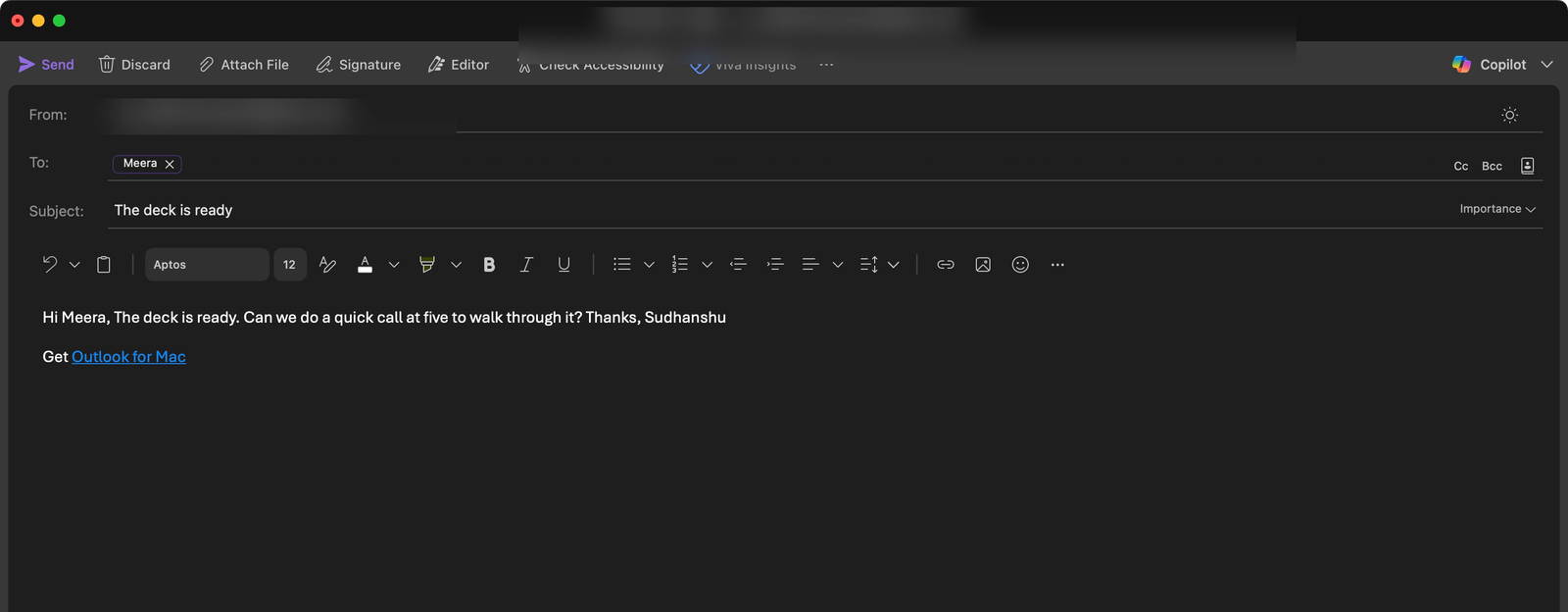
Bring your Mac’s Mail app into your workflow.
Ask for live weather when connected.
Discover installed apps and ask about your Mac.
Ask its name, what it can do and which tools are available.
Capture a thought and return to your notes.
Review your schedule and supported calendar workflows.
Explore to-dos and reminder workflows.
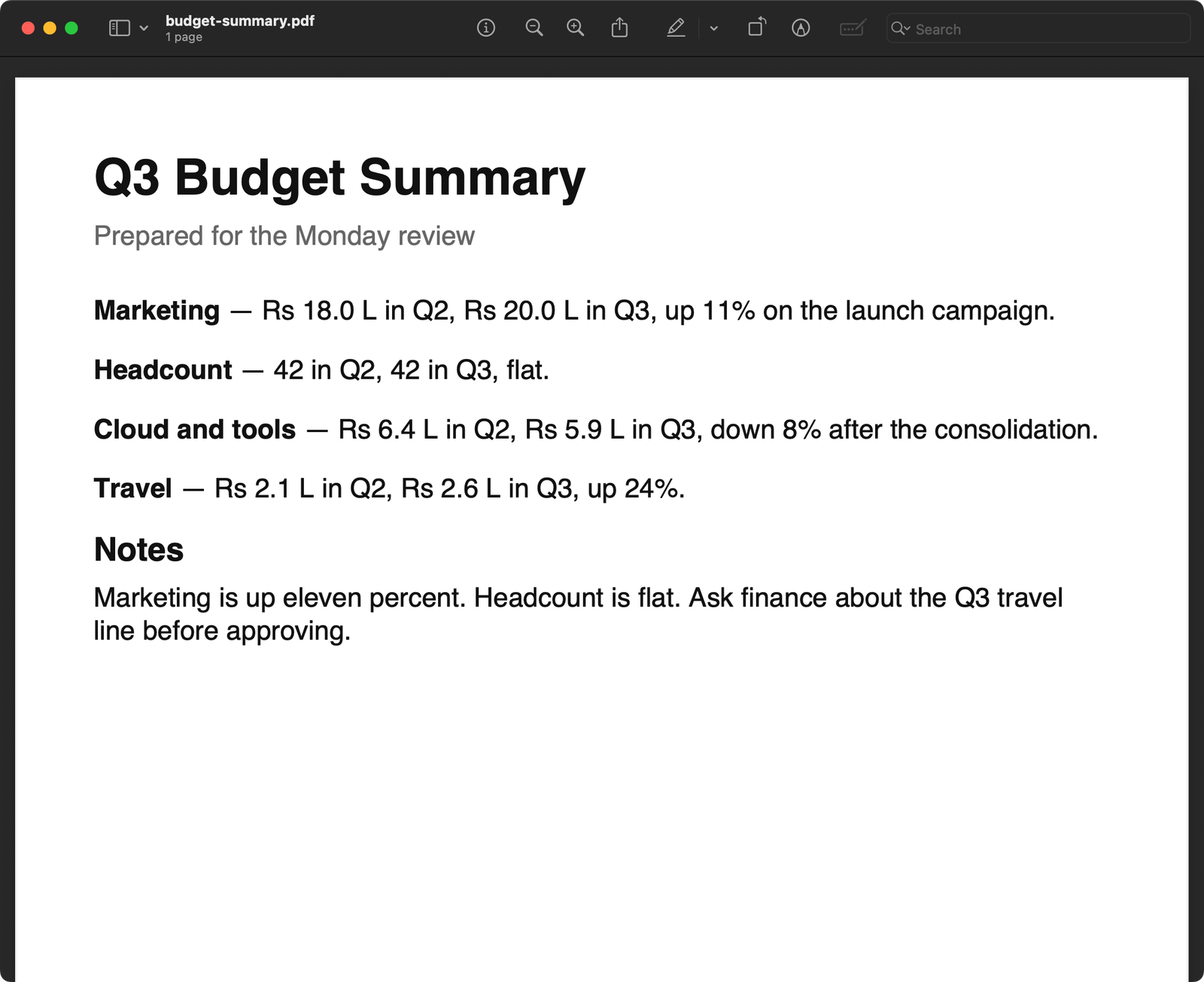
Open Preview for your PDFs and images.
Open Calculator, or ask Cuee a calculation.
Open Shortcuts to access your Mac automations.
Opening an installed application and performing actions inside it are different capabilities. The complete app directory below shows current and planned coverage.
Local-first processing. Visible permissions. Review before action. Stop at any time. Cuee is designed to keep you in control of your work.
Pay once. Keep your licence forever. One year of updates included.
Supported local tasks work offline after setup. Websites, weather and connected services need internet.

Choose the project folders Cuee can read. Broader indexed knowledge has separate setup and release gates.
Single-use approvals are bound to the proposed change. A changed or stale proposal needs a new review.
Review proposed memories before they are saved. Keep, edit or remove the preferences Cuee uses.
Proposed Super Cuee capabilities: more ambitious workflows, creative tools and research, with your approval. These describe the planned product, not capabilities available to purchase today.
Tell her what you want her to be able to do. She turns it into a skill and it's ready to use.
Do a task once while she watches. Next time, just ask and she does it the same way.
When you keep doing the same thing, she notices and offers to do it for you from now on.
Tell her the result you want. She works out the steps, does them, and checks her own work.
Paste a link to any app or tool. She tells you what it does, whether it's free, and if it's worth adding.
Share your background and who you want to reach. She rewrites your headline, About section and company page.
She studies your past posts, so everything she writes sounds like you, not like a robot.
She plans a month of posts: topics, formats and dates, based on what's trending in your field.
She writes attention-grabbing opening lines and rates your post before you publish it.
X threads, Instagram captions, LinkedIn posts and Facebook or Instagram ads, from one idea.
She checks your website or blog post and tells you exactly what to fix so more people find it.
Describe your product. She makes a polished animated video, ready to share.
Give her a topic. She writes the script, adds footage, voice-over, subtitles and music.
Talk through your ideas out loud. She turns them into a finished reel.
Give her any topic. She searches many sources and hands you a clear report with links.
Before each meeting she briefs you: who you're meeting, what you discussed last time, the latest news, and questions to expect.
Name a competitor. She tells you what they launched, what people say about it, and how it's doing.
Pick the news sources you trust. Every morning she reads you a short spoken briefing.
Paste a video link. She tells you what it says and what viewers are asking in the comments.
She finds papers on any subject and explains them in plain words.
Share a rough idea. She asks the right questions and helps you shape it into a clear plan.
Give her a big goal. She breaks it into clear, ordered steps you can tick off.
Watch each step as she works. Pause or take over anytime.
Long tasks carry on even if your Mac restarts, and she tells you when they're done.
She shows you every new skill, post or message before it's used or sent.
Super Cuee is a paid upgrade with no monthly Cuee licence fee. Local AI runs on your Mac; online research and stock-footage downloads require internet. Optional third-party services may have their own terms or fees.
Online research, connected accounts and third-party services may require internet access or their own fees. Local processing does not make every workflow offline or every service free.
How the Cuee upgrade will work →Feature guide
Your everyday tools, document intelligence and Mac assistance. Super Cuee includes these capabilities too. This guide follows the updated 26 September capability audit.
103 capabilities
Keep core local tasks moving even when your connection drops.
Speak naturally with your personal AI while you stay with your work.
A dedicated private chat window for quiet questions and typed replies.
Return to previous conversations with useful context close at hand.
Keep an ongoing exchange with context carried between your questions.
Shape a familiar AI experience around the name and preferences you choose.
Choose the tone and response preferences that work for you.
A familiar way of addressing you that feels right for you.
Use your voice to activate Cuee, with the hotkey available as another way to start.
Turn speech into text in the app you are using.
Cuee understands which supported apps are installed on your Mac.
Ask Cuee to open a supported application on your Mac.
“Open Notes.”
Bring the app you need to the front.
“Bring Safari to the front.”
Close a supported app normally, with unsaved work left for you to review.
“Close Notes.”
Capture a thought as a local text note without stopping to type.
“Save a note: ask Alex about the proposal.”
Set a timer and keep your attention on the task.
“Set a ten-minute timer.”
Work out totals, percentages and everyday maths in one conversation.
“Split 1,260 between three people.”
Check current weather; an internet connection is required.
Set aside focused work time with a timed break.
“Start a focus session.”
Alternate focused work with a timed break.
Check your Apple Calendar schedule in one place.
Know which calendar an event comes from.
See connector status and when it last synced.
Find the days when your schedule is busiest.
Avoid counting equivalent events twice.
Review potential scheduling conflicts before a change.
Decide which project folders Cuee can access.
Ask about supported text in your approved workspace.
Inspect code within the project you selected.
Bring CSV files into your document workflow.
Choose a PDF, ask a question and review the supporting content without a cloud AI upload.
“What are the key dates in this PDF?”
Work with supported DOCX content in your selected folders.
Read supported rich-text documents locally.
Keep source references alongside document answers.
See the proposed differences before approving a file edit.
Catch a stale proposal before it overwrites newer work.
Create files within an approved workspace.
Apply reviewed changes to supported files.
Copy files within your approved scope.
Move approved files with visible control.
Compress selected files without a separate manual workflow.
Use undo receipts for supported reversible changes.
Inspect Git branches without changing the repository.
Inspect read-only Git status and history.
Capture your screen on-device.
Extract text from screenshots locally.
Say what you need to remember and review the reminder on your list.
“Remind me to call Alex tomorrow at ten.”
Ask what is due and see the tasks waiting for your attention.
Mark a reminder complete when the task is done.
“Mark the proposal review as done.”
Add your Google account to Apple Calendar on your Mac. Cuee reads the calendars you grant access to through Apple Calendar; this is not a direct account connector.
Add your Microsoft / Outlook account to Apple Calendar on your Mac. Cuee reads the calendars you grant access to through Apple Calendar; this is not a direct account connector.
Preview and approve a new calendar event.
Review and approve a change to an existing event.
Review and approve an event cancellation.
Run approved test recipes within a bounded project workflow.
Use approved lint recipes to check your project.
Run approved build recipes with controlled execution.
Find answers across the private sources you choose.
Connect information across approved projects.
Ask about interfaces, images, and on-screen context.
Review the preferences and facts you want Cuee to remember.
Start the day with a useful briefing.
Review your day and prepare for tomorrow.
Make repeated tasks part of your day or week.
Bring relevant notes and context into your next meeting.
“Prepare me for my next meeting.”
Get suggestions for follow-ups and rescheduling.
Turn the volume up, down, mute or set a level by voice.
Ask Cuee to brighten or dim your display.
Turn macOS dark mode on or off by asking.
Turn Do Not Disturb on or off mid-task.
Dictate a message to a contact; nothing sends without your yes.
Say what your email needs to achieve, then review the draft.
“Draft a reply asking to move our meeting.”
Provide a recipient, subject and message when you know what you want to say.
Get the substance of a document without reading all of it.
Share a link and get its key points in plain language.
“Summarise this webpage.”
Ask Cuee to run a supported Shortcut by name.
Save a phrase as a repeatable skill and run it later.
Talk through ideas and return to useful thoughts from a session.
“Let’s brainstorm my presentation.”
Review your daily and weekly focus sessions.
Cuee’s local-only control blocks connected features inside the app. It is separate from a system firewall.
Keep useful preferences under your control. Durable memory belongs to Cuee.
Cuee refuses requests to reveal passwords, including Wi-Fi passwords.
Requests for broad deletion are refused, helping protect your files and notes.
Review supported calendar, reminder and memory changes before you approve them.
End a conversation with a natural response rather than a fixed closing line.
Ask Cuee to play music from your Mac’s Music library.
Open a separate browsing session from your conversation.
Choose a more personal conversational tone while keeping clear that Cuee is AI.
Name a website and ask Cuee to open it in Safari.
Ask Cuee to open search results on a supported website. Internet required.
Say “Stop” to interrupt the interaction.
Ask which Mac permissions Cuee has and control access in System Settings.
Return to the record of requests you have made.
Cuee asks before force-quitting an application.
Cuee asks you to clarify requests it cannot confidently interpret.
The local brain unloads after inactivity and returns when you need it.
Pause Music without switching away from your work.
Turn meeting content into decisions and next steps using local AI.
Ask naturally, such as “Could you open Calculator?”
Ask for a summary of the page already open in Safari.
Casual conversation is kept separate from requests to change something.
See progress while the local brain gets ready.
Combine supported tasks in one request, then review the results.
Feature names describe the task; edition labels describe licence entitlement. In-testing and coming-soon features are not promised as ready. Ask about your chosen workflow in a guided trial.
Explore supported Mac apps, followed by proposed integrations with your favorite work tools.
Your tools. One personal assistant.
73 app entries
Reads your day and finds free time.
Mac permission may be requiredLists what's due and adds reminders.
Mac permission may be requiredFinds and creates notes.
Mac permission may be requiredLooks up people you know.
Mac permission may be requiredSearches folders you approve.
Mac permission may be requiredUses your city for local answers.
Mac permission may be requiredOpen Mail. Reading email and drafting require the appropriate Mac permissions.
Supported app actionsOpen Safari and web pages. Actions within a page depend on the supported workflow.
Supported app actionsOpen Music. Playback actions depend on permissions and the current app workflow.
Supported app actionsCheck weather with internet access, or open the Weather app.
Internet requiredPrepare a message for review. Sending requires your approval.
Mac permission requiredRun a configured Mac Shortcut by name, including your Do Not Disturb controls.
Configured Mac ShortcutsOpen Books on your Mac. Reading or editing its content is not implied.
App openingOpen Preview for your documents. Deeper controls are not advertised.
App openingOpen TextEdit as a place to write. Dictation has its own availability.
App openingOpen Calculator, or ask Cuee for a calculation directly.
App opening · CalculationsOpen Clock. Cuee’s timers are a separate assistant feature.
App openingThe apps below are proposed integrations, not currently available connections. Supported Mac apps are listed above.
Proposed capability: summarises and searches your inbox.
Direct account connection is planned. Google and Microsoft calendars can be read through your Mac’s Apple Calendar account setup.
Proposed capability: catches you up on channels.
Proposed capability: catches you up on Teams chats.
Proposed capability: knows your upcoming Zoom calls.
Proposed capability: reports payments and settlements.
Proposed capability: read repositories, issues and pull requests; drafts changes only with your approval.
Proposed capability: read Linear issues and projects; creating issues asks first.
Proposed capability: read Sentry issues and error details.
Proposed capability: run read-only SQL against a Postgres database.
Proposed capability: search and read your Notion pages and databases.
Proposed capability: search and read Google Drive files.
Proposed capability: read and search files inside one folder you choose; nothing outside it.
Proposed capability: query a SQLite database file you choose.
Proposed capability: web and local search through your Brave Search API key.
Proposed capability: browse in a separate private session. Browsing is not added to Cuee chat history.
Proposed capability: tracks merge requests.
Proposed capability: finds tickets and sprint status.
Proposed capability: reports deployment status.
Proposed capability: checks zones and workers.
Proposed capability: answers questions about your project.
Proposed capability: lists containers and images.
Proposed capability: finds team documentation.
Proposed capability: lists tasks due this week.
Proposed capability: reads boards and cards.
Proposed capability: lists tasks and docs.
Proposed capability: reads and adds to-dos.
Proposed capability: reads bases and records.
Proposed capability: searches your vault locally.
Proposed capability: finds notes and notebooks.
Proposed capability: reads files and comments.
Proposed capability: reads boards.
Proposed capability: lists booked meetings.
Proposed capability: catches you up on servers.
Proposed capability: summarises chats.
Proposed capability: joins you to the right call.
Proposed capability: summarises recordings.
Proposed capability: lists upcoming meetings.
Proposed capability: reads and summarises docs.
Proposed capability: answers questions from sheets.
Proposed capability: finds files in Dropbox.
Proposed capability: finds files in Box.
Proposed capability: finds files in OneDrive.
Proposed capability: looks up contacts and deals.
Proposed capability: looks up accounts and opportunities.
Proposed capability: reports revenue and payments.
Proposed capability: reports orders and products.
Proposed capability: summarises open tickets.
Proposed capability: summarises conversations.
Proposed capability: reports invoices and expenses.
Proposed capability: reports invoices and bills.
Proposed capability: reports campaign results.
Proposed capability: reports transactions.
Proposed capability: controls playback.
Logos identify apps in the directory, not connected accounts. Check each entry’s status. Online services need their own account and may charge separately.
Start with one useful thing. Discover the rest as you go.
Open Cuee on your Mac and follow the setup guidance for local AI.
Type, or choose voice when it’s ready. Allow the access your chosen task needs.
Ask to open an app or save a note. Check the result, then make Cuee part of your day.
New to Cuee? Arrange a guided setup. Explore features here without connecting an account or using your microphone.
Local AI assistant for Mac · founder list
Cuee is your personal AI assistant for Mac. Talk or type to ask questions, work with documents, capture notes and carry out supported Mac tasks. Local AI processing keeps supported work on your own computer.
Cuee is for Mac users who want a private desktop assistant, useful offline capabilities and a one-time licence instead of another monthly AI subscription.
It is especially relevant when you prefer to keep document processing on your Mac and want help across notes, documents and supported apps. If a particular voice, browser or connected-app workflow is essential, confirm its readiness in a guided trial before buying.
The value is one personal assistant for several parts of your day: local conversation, document questions, notes, supported Mac actions and everyday tools—not a separate subscription for each task.
Pay $299 once for a perpetual Cuee licence, one year of product updates and the planned core Cuee capabilities as they are released. The value depends on the workflows you actually use; future features are not a promise that everything is available today.
Supported local tasks can work offline after the required local components are installed. Local processing and an offline task are different from a service that needs fresh online data.
Complete initial setup while connected. Then use supported local conversation, document and desktop workflows. Weather, websites, online account connections and update downloads need internet access.
Local document processing is designed to work on your Mac with the folders you approve, without requiring a cloud AI upload. Access controls and reviewable actions keep you involved.
Online connectors and browsing exchange data with the services you choose. Check permissions, connect only the accounts you need and review important actions. Local processing is a privacy advantage, not a guarantee of 100% security.
The current application configuration targets macOS 15.7 or later. Current testing focuses on Apple Silicon Macs. Intel compatibility has not been established by the evidence used for this website.
Before purchase, check your Mac model and macOS version in About This Mac and ask the Cuee team to confirm compatibility with the release you will install.
Current test evidence includes an Apple Silicon Mac with 16 GB RAM. That is a tested configuration, not a verified minimum requirement. Minimum RAM and free-storage requirements are still being qualified.
Local AI components need memory and disk space, and other running apps affect performance. Share your Mac model, RAM and available storage with the team before purchase; do not assume that an 8 GB configuration has been approved.
English is the current focus of the voice testing reviewed for this website. We are not advertising verified multilingual voice support.
Typed conversation, speech recognition and spoken replies are different paths and can have different language limits. If you need another language or mixed-language dictation, confirm that exact workflow during a guided trial.
Voice and dictation can misunderstand names, numbers, accents and noisy speech. The 26 September audit reports dictation into TextEdit passing 6/6 and successful voice conversations. Those are bounded observations, not an accuracy guarantee. Review dictated text and consequential actions before using them.
Join the founder list to hear when the official installer is available. We will release a signed and notarized Mac installer after release checks are complete. Installation instructions will accompany that release; do not bypass macOS security protections.
Product updates are included for one year from purchase. We plan regular releases, with timing based on readiness rather than a guaranteed fortnightly schedule. Release emails will explain new capabilities, fixes and installation steps.
When a release is ready, the planned update email will identify the version and explain its new capabilities and fixes.
Read the release notes, follow the official installation instructions in the email and confirm the installed version afterwards. Seamless automatic updating is not claimed here. If you are missing an expected email or cannot update, contact hello@cuee.app.
Email hello@cuee.app for compatibility questions, guided setup, release information or help with a workflow.
Describe what you expected, what happened, your Mac model, macOS version and Cuee version. Do not send passwords, API keys or private documents. The team can help you decide what information is needed to investigate.
Cuee offers a 14-day, no-questions-asked refund policy from purchase. If it is not right for you, you can request a refund within that period.
Email hello@cuee.app with your purchase email and order reference, and ask for a refund. You do not need to justify your decision. Do not include payment-card details. Payment processing and return timing will be handled through the purchase provider.
Your purchase includes a perpetual Cuee licence, all core Cuee capabilities subject to their release status, and one year of product updates. The former Personal, Professional and Executive capabilities are combined into Cuee. Super Cuee is separate and is not included in the $299 price.
Keep your purchased Cuee features forever with no recurring Cuee licence fee. Product updates are included for one year. After that, keep using your eligible version; additional updates can be an optional purchase with no automatic renewal. An upgrade to Super Cuee starts a fresh year of updates. Online services may have separate costs.
Cuee’s planned founder price is $299, with a planned launch price of $499. Super Cuee’s proposed founder price is $499, with a planned regular price of $699. During the founder upgrade offer, a $299 Cuee purchase receives credit toward a $200 upgrade. Upgrade availability and final terms will be shown when sales open.
Join the founder list by emailing hello@cuee.app. There is no charge or purchase commitment. We will email launch details when secure checkout and the signed, notarized installer are ready. You can also ask about compatibility or a guided demonstration.


Command asks Cuee to carry out a supported task, such as opening Notes. Conversation is for asking questions and discussing ideas. Dictation turns the words you speak into text for your active app.
Choose the mode that matches your intention and review any proposed text or action. Airplane Mode is a separate local-only setting, not a fourth type of conversation.
Cuee provides a local chat experience with conversation history, so you can return to earlier exchanges. Local chat storage is different from sending content to an online service.
Review the app’s privacy and memory controls. Conversation history does not mean that every earlier turn is automatically reused in every voice interaction; voice-context behaviour must be checked for your release.
Cuee’s local-only setting blocks its connected features while keeping supported local work available. Online weather and account services will not work in that mode.
It controls Cuee’s behaviour; it is not a system-wide firewall and does not disconnect other Mac applications from the internet. Initial downloads and updates still require a connection.
Cuee can work with supported installed apps, including opening, bringing forward and closing them normally. The directory lists Mac apps such as Notes, Mail, Safari, Music and Calendar.
Ask for a specific action and check the result. Opening an app does not mean Cuee can perform every action inside it. Permissions, supported controls and unsaved work can affect what happens next.
Capture a thought as a note or talk through an idea with Cuee. Ask “Save a note: ask Alex about the proposal,” then check the saved note. For brainstorming, explain your idea and ask Cuee to help organise it or return to a saved session.
Choose the destination text field, press Ctrl+Shift+Space, speak, then press the hotkey again. Review the text before sending or saving it. Dictation writes your words; a command asks Cuee to perform a task. Accuracy depends on speech, background noise and the destination app.
Ask about a supported PDF, Word, rich-text or data file in a folder you approve. The current audit reports successful document answers and summaries. Check the cited source, especially for important facts; one document test does not establish perfect accuracy across all files.
Webpage summaries help you get the key points from a link. Fetching a webpage requires an internet connection.
Share a supported link and review the summary against the source. Follow-up questions grounded in a webpage are a broader workflow still being evaluated; the website does not present them as verified merely because summarisation exists.
Cuee includes reminder and calendar workflows with approval for supported changes. The 26 September audit reports successful reminder and calendar journeys, including create, move and cancel. Google and Microsoft calendars are accessed through accounts configured in Apple Calendar, not direct Cuee account connectors. Verify the event, date and time before approval.
Cuee creates meeting notes that organise decisions and next steps using local AI. Review the notes before sharing them. Automatic identification of speakers by name is a separate capability; the attendee list in a calendar does not by itself identify recorded voices.
Cuee includes a private browser companion. Ask Cuee to open it for a separate browsing session. Websites still require internet access and receive the requests you send them. Private browsing is not anonymity from websites or your network provider.
Online connections such as Gmail, Slack, Teams, Zoom, GitHub, Notion and Drive belong to the proposed Super Cuee integrations. They are grouped under Proposed Super Cuee apps, rather than presented as active connections. Cuee can read Google and Microsoft calendars through accounts you configure in Apple Calendar.
Keep useful preferences with your approval, ask questions across approved knowledge folders and use supported tools for defined tasks. Review proposed memories before saving them and control which folders Cuee can access. Super Cuee’s proposed goal planning and new skill learning are separate from these current tools.
Ask Cuee to capture and read your screen with permission, inspect an approved project, or propose file changes. For supported projects, you can request a build, tests or linting and review the action before it runs. Keep folder access limited to what the task needs and check the reported result.
Cuee also includes everyday tools such as calculations, timers, Pomodoro focus and weather workflows. They support the main personal-assistant experience rather than being separate paid add-ons.
Ask a clear question such as “What is 210,000 divided by five?” or “Set a ten-minute timer.” Check the answer or timer result. Weather needs internet access; confirm the exact workflow and release availability during setup.